
Claymore’s Dual Miner – Ethereum & Ethereum Classic Dual Mining DCR,SIA,LBRY,PASC

Few days ago i was showing you how to mine Ethereum Classic (ETC) and what miner to use, also my recommendation was Claymore’s Dual Miner.. you may ask “why claymore? it has developer fees etc”.. well.. like no other miner Claymore’s miner has the dual mining feature and the fees are very minimal 1% .. basically you can mine two coins at the same time. For example you can mine Ethereum (ETH) or Ethereum Classic (ETC) and Decred (DCR), Siacoin (SC), LBRY Credits (LBC) or (new added) PascalCoin (PASC) at the same time without altering ETH / ETC hashing speed at all.. with just a little more power usage you can earn even more, but there will be another 1% dev fees for using the dual mining feature.
So we have
#1 Claymore dev fees of 2% and
#2 mining pool fees 1%, a total of 3% in fees.
Not much 🙂
In this tutorial i will show you how to mine Ethereum / Ethereum Classic and Decred, Siacoin, LBRY Credits or the newly added PascalCoin with Claymore’s Dual Miner!
How much can i earn with the dual miner?
With Claymore’s Dual Miner you can mine Decred (DCR), Siacoin (SC), Lybr (LBC) as secondary altcoin. Let’s say you have a RX 470 4gb rig and your hashing speed for Ethereum and Ethereum Classic is 22.xx Mh/s per card at stock settings, then the hashing speed for the other three coins will be
- Decred: 321 Mh/s* (x6 1,926 Mh/s)
- Siacoin: 390 Mh/s* (x6 2,340 Mh/s)
- Lbry Credits: 30 Mh/s* (x6 180 Mh/s)
- PascalCoin: 145.6 Mh/s* (x6 870 Mh/s)
Before to get started with the tutorial showing you how to mine Decred, Siacoin or LBRY Credits as secondary coin along with Ethereum and Ethereum Classic using Claymore’s Dual Miner, make sure you have the best hardware for your mining rig, if you don’t have one yet and you plan to build one, here is the best configuration
Now that we have cleared this aspects, let’s start with the mining. For this tutorial i will use the following specs:
- 3x Asus Strix OC AMD Radeon R7 370 4GB GPUs, rig components
- AMD Drivers 16.9.2
- MSI Afterburner or Wattman/GlobalOverdrive
- Binance account for wallet
- Claymore’s Dual Ethereum AMD+NVIDIA GPU Miner v7.4 (Windows/Linux) DOWNLOAD AND MORE HERE
Note that my hashing speed will be very low
Let’s get started!
A) How to mine Ethereum (ETH) or Ethereum Classic (ETC)
1 How to mine Ethereum (ETH)First of all we will have to create the standard files for mining Ethereum or Ethereum Classic only, after that will add the codes for dual mining options.
Mining Ethereum (ETH) only configuration:
- Extract the files from archive (if you did not downloaded the miner yet, click here)
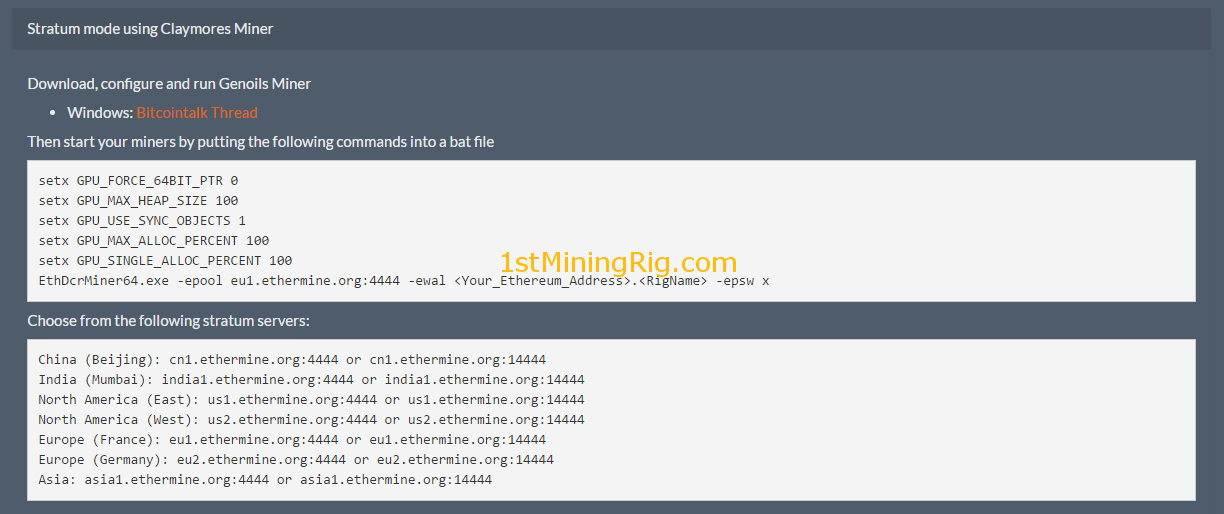
- I am going to use https://ethermine.org/ pool for Ethereum
- Create a “New Text Document” inside the extracted folder and paste the following code: EthDcrMiner64.exe -epool eu1.ethermine.org:4444 -ewal <Your_Ethereum_Address>.<RigName> -epsw x
- Replace <Your_Ethereum_Address> with your wallet key, <RigName> with your rig name and also eu1.ethermine.org:4444 if you are not located in EU, go to https://ethermine.org/ home page for full pools list.
- Save the file as .bat and name something like “ETH.bat“, we are going to add later the Decred code for dual mining, however if you run the bat file it will start mining Ethereum only, so if you want to get going with this only feel free to run it.


Mining Ethereum Classic (ETC) only configuration:
- I will use again ethermine for ETC but this time the url is different, here is the link: https://etc.ethermine.org/
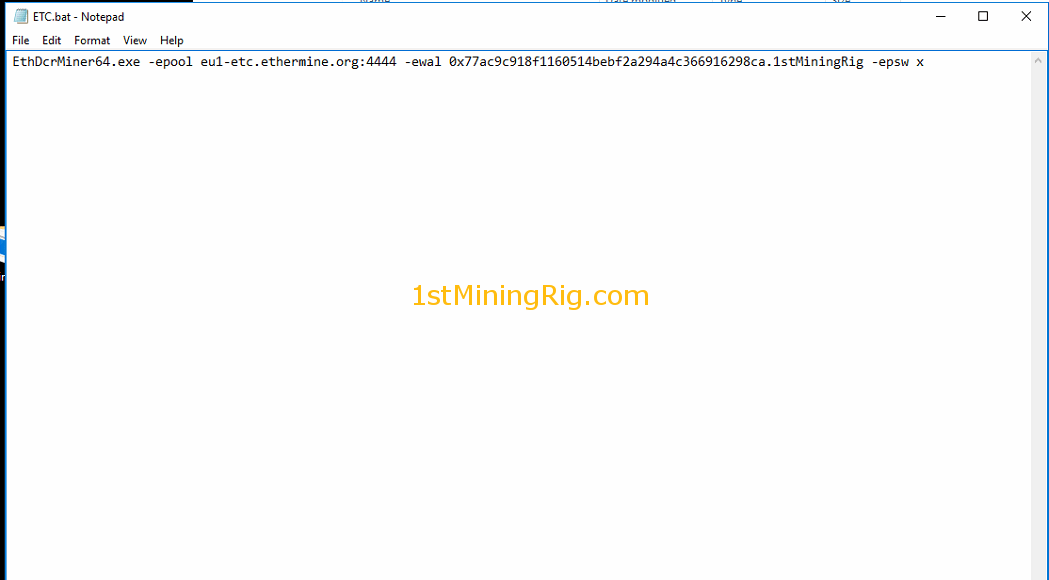
- Create again a "New text document" inside the mining software folder and paste the following code: EthDcrMiner64.exe -epool eu1-etc.ethermine.org:4444 -ewal <Your_Ethereum_Address>.<RigName> -epsw x
- Replace <Your_Ethereum_Address> with your wallet key, <RigName> with your rig name and also eu1-etc.ethermine.org:4444 if you are not located in EU, go to https://etc.ethermine.org/ home page for full pools list.
- Save the document as .bat and name it ETC.bat
- Run it if you want to mine Ethereum Classic (ETC) only

Now that we have your mining files ready, let start to setup the dual mining feature for each.
B) Ethereum (ETH) & Ethereum Classic (ETC) dual mining Decred (DCR)
1 Preparing Decred Wallet and Mining Pool- #1 Create a Decred (DCR) wallet, you have two options, one is to create a wallet online https://wallet.decred.org/, or to download it from here https://github.com/decred/decred-binaries/releases/, for a easier download, select one of this two (64-bit ↓, 32-bit ↓), (Mac ↓, Linux ↓), i am going to use the online version found at https://wallet.decred.org check this video https://www.youtube.com/watch?v=HigoCaap-aE
- #2 Another way to create a wallet key for Decred is to signup with https://poloniex.com/, then go to “Deposits & Withdrawals“, the search form type “decred” then click on “deposit” and it will generate a new key.
- Go to https://dcr.suprnova.cc and create an account if you don’t have one
- Then go to “My Account” ->”My Workers” and create a worker
- Add your wallet key in to your “Payment Address” by accessing “Edit Account“
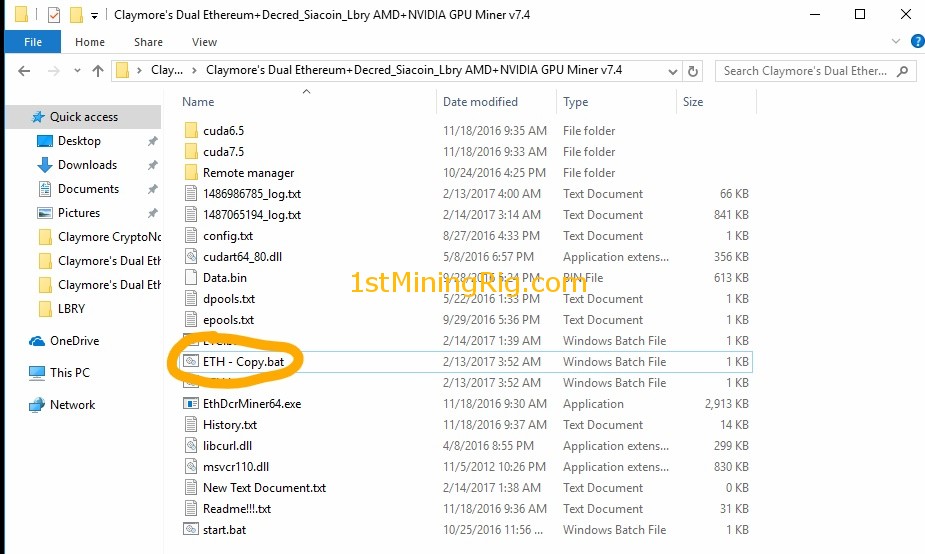
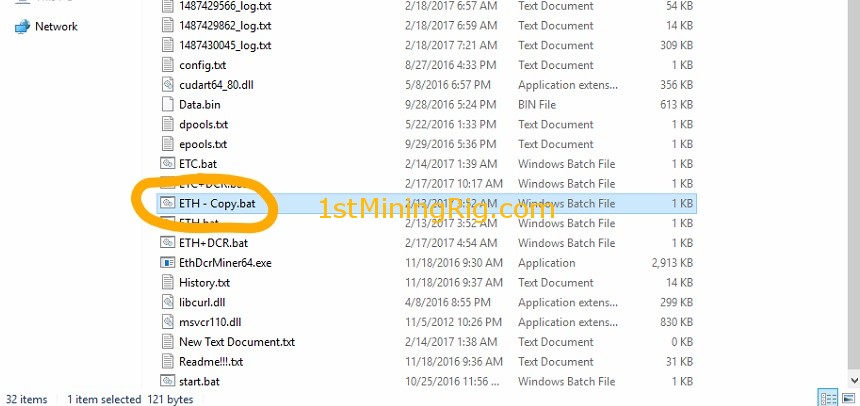
- Go to Claymore’s Dual Ethereum+Decred_Siacoin_Lbry AMD+NVIDIA GPU Miner v7.4 folder, then copy the ETH.bat/ETC.bat file and paste it in the same folder, the system will automatically create a copy of the file that we created earlier, something like ETH – Copy.bat/ETC – Copy.bat.
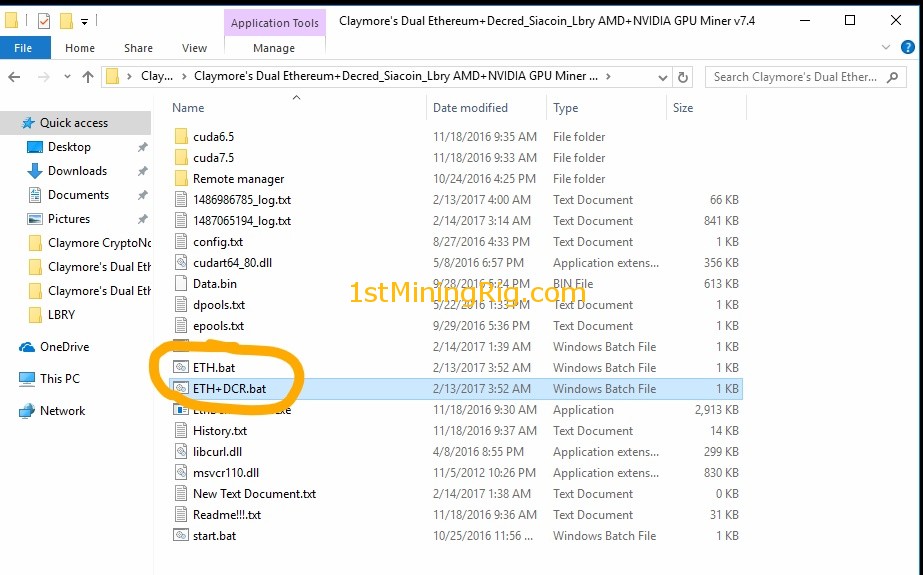
- Rename ETH – Copy.bat/ETC – Copy.bat to something like ETH+DCR.bat/ETC+DCR.bat
- Right click on ETH+DCR.bat/ETC+DCR.bat, and click “Edit“
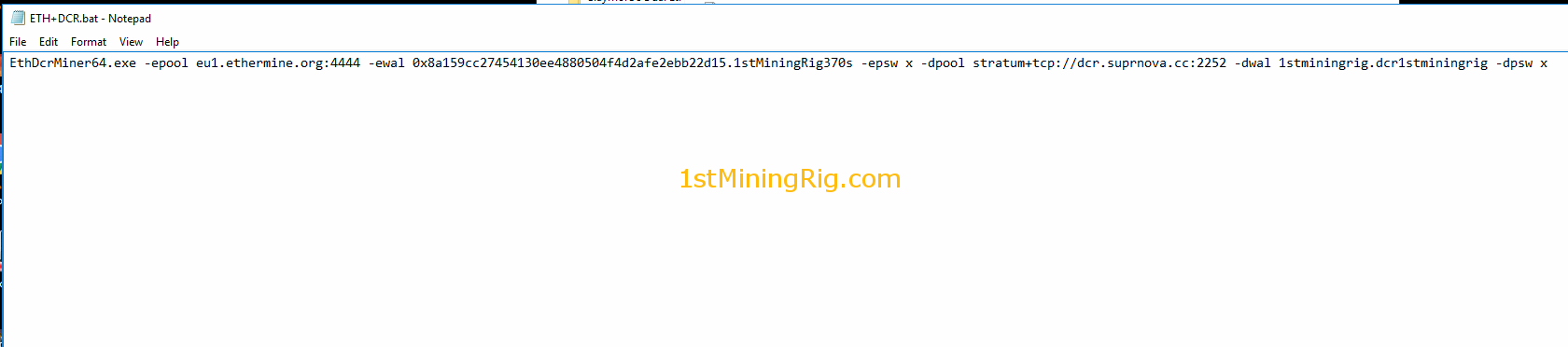
- Right after -epsw x, paste the following code -dpool stratum+tcp://dcr.suprnova.cc:2252 -dwal USERNAME.WORKER -dpsw PASSWORD
- For username, worker and password use the details from suprnova account.
- The final code for ETH+DCR should look like this: EthDcrMiner64.exe -epool eu1.ethermine.org:4444 -ewal walletkey.rigname -epsw x -dpool stratum+tcp://dcr.suprnova.cc:2252 -dwal username.worker -dpsw password
- The final code for ETC+DCR should look like this: EthDcrMiner64.exe -epool eu1-etc.ethermine.org:4444 -ewal walletkey.rigname -epsw x -dpool stratum+tcp://dcr.suprnova.cc:2252 -dwal username.worker -dpsw password
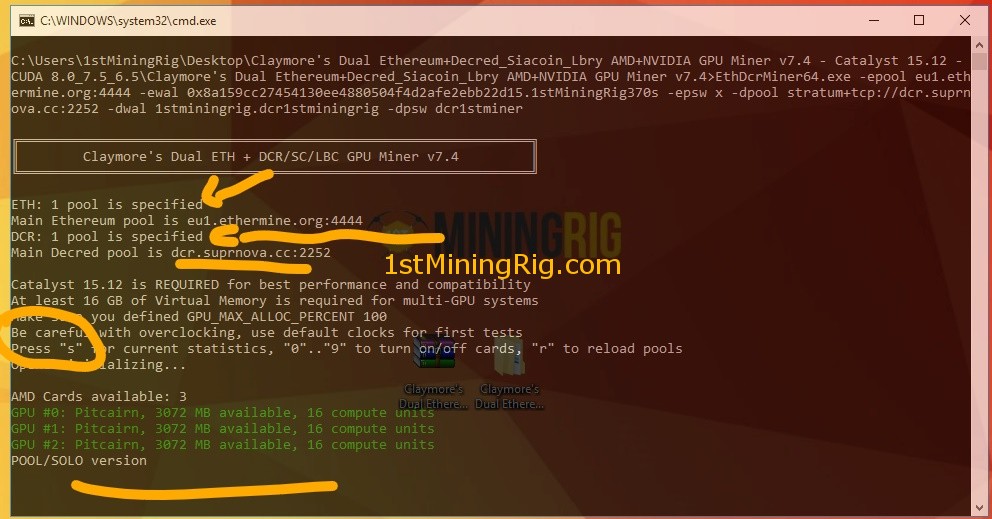
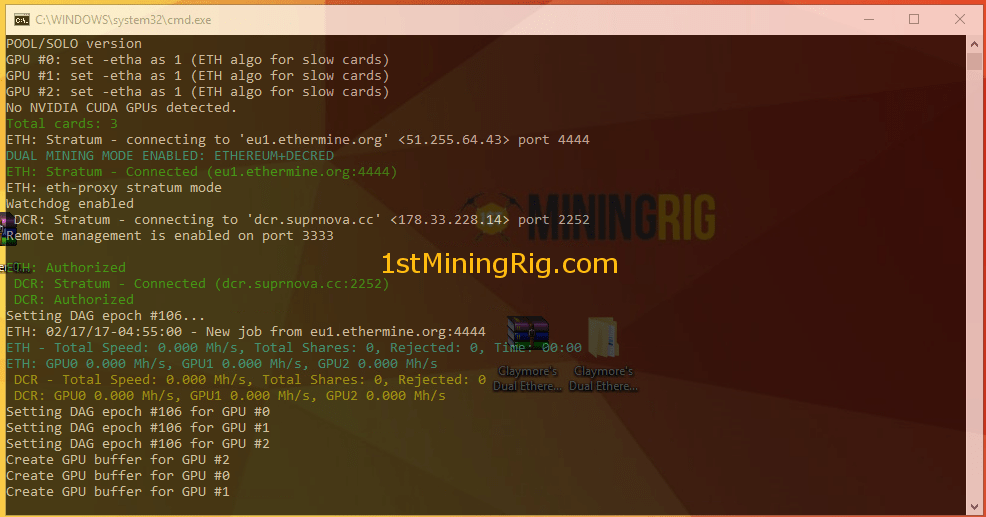
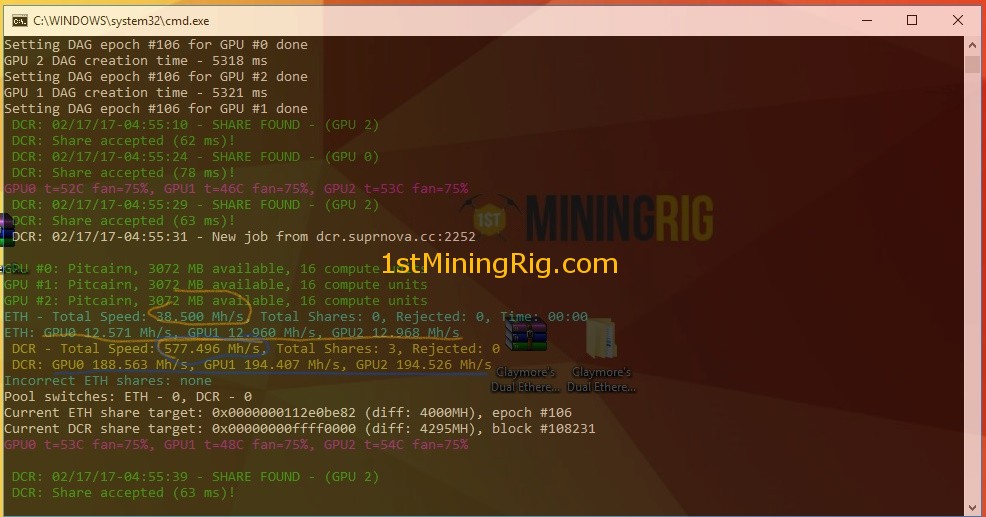
- All set, run the bat files and it will start mining ETH or ETC and DCR at the same time
Mining profits for Decred only (price $1.92126, February 8 2017):
| Min | DCR0.000 | $0.000 |
|---|---|---|
| Hour | DCR0.004 | $0.008 |
| Day | DCR0.095 | $0.182 |
| Week | DCR0.664 | $1.276 |
| Month | DCR2.847 | $5.470 |
Remember that i have a very low hashing speed with this cards
C) Ethereum (ETH) & Ethereum Classic (ETC) dual mining Siacoin (SC)
1 Preparing Siacoin Wallet key and Mining Pool- #1 First of all download the latest wallet version here: https://github.com/NebulousLabs/Sia-UI/releases/
- Extract the files and start the Sia-UI.exe file, follow the registration steps and your a done.
- Click on “Receive Siacoin” and your wallet key will popup
- #2 Another way to create a wallet key for Siacoin is to signup with https://poloniex.com/, then go to “Deposits & Withdrawals“, the search form type “siacoin” then click on “deposit” and it will generate a new key.
- Go to https://sia.suprnova.cc/ and create an account if you don’t have one
- Then go to “My Account” ->”My Workers” and create a worker
- Add your wallet key in to your “Payment Address” by accessing “Edit Account“
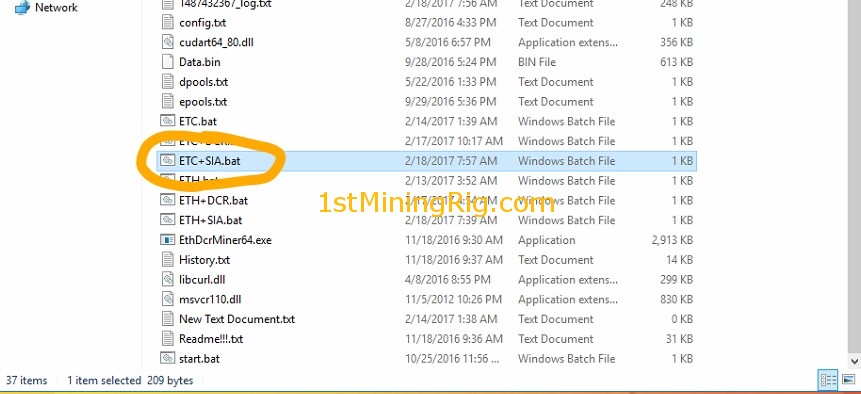
- Go to Claymore’s Dual Ethereum+Decred_Siacoin_Lbry AMD+NVIDIA GPU Miner v7.4 folder, then copy the ETH.bat/ETC.bat file and paste it in the same folder, the system will automatically create a copy of the file that we created earlier, something like ETH – Copy.bat/ETC – Copy.bat.
- Rename ETH – Copy.bat/ETC – Copy.bat to something like ETH+SIA.bat/ETC+SIA.bat
- Right click on ETH+SIA.bat/ETC+SIA.bat, and click “Edit“
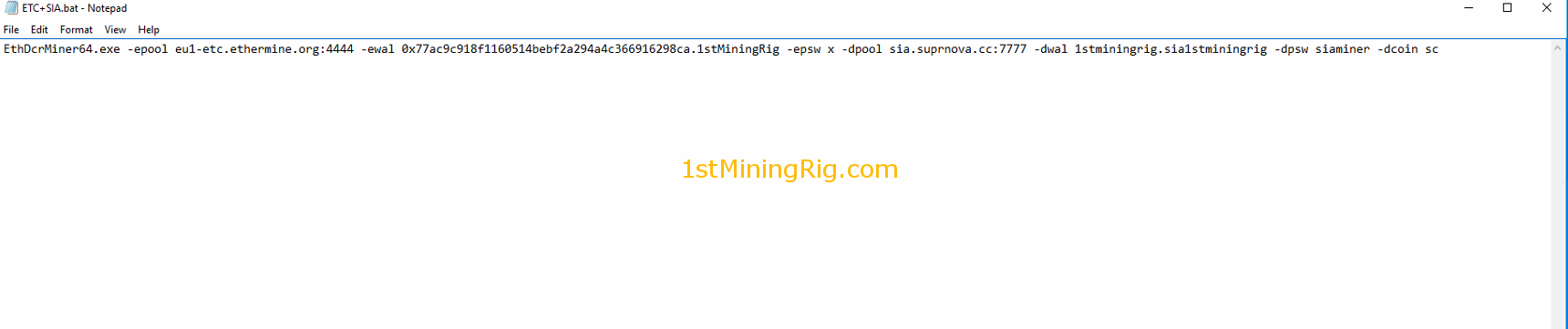
- Right after -epsw x, paste the following code -dpool stratum+tcp://sia.suprnova.cc:2786 -dwal USERNAME.WORKER -dpsw WORKERPASS -dcoin sc
- For username, worker and password use the details from suprnova account.
- The final code for ETH+SIA should look like this: EthDcrMiner64.exe -epool eu1.ethermine.org:4444 -ewal WALLETKEY.RIGNAME -epsw x -dpool stratum+tcp://sia.suprnova.cc:7777 -dwal USERNAME.WORKER -dpsw WORKERPASS -dcoin sc
- The final code for ETC+SIA should look like this: EthDcrMiner64.exe -epool eu1-etc.ethermine.org:4444 -ewal walletkey.rigname -epsw x -dpool stratum+tcp://sia.suprnova.cc:7777 -dwal USERNAME.WORKER -dpsw WORKERPASS -dcoin sc
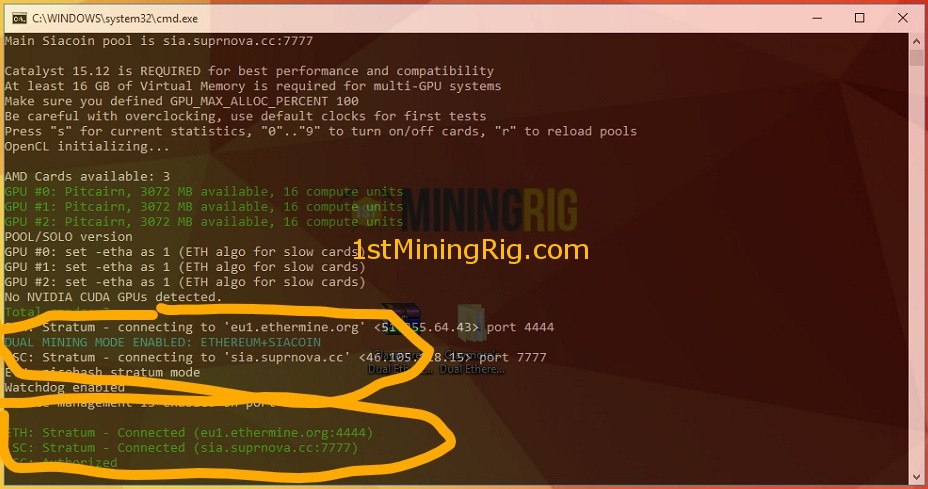
- All set, run the any bat files and it will start mining ETH or ETC and Siacoin at the same time

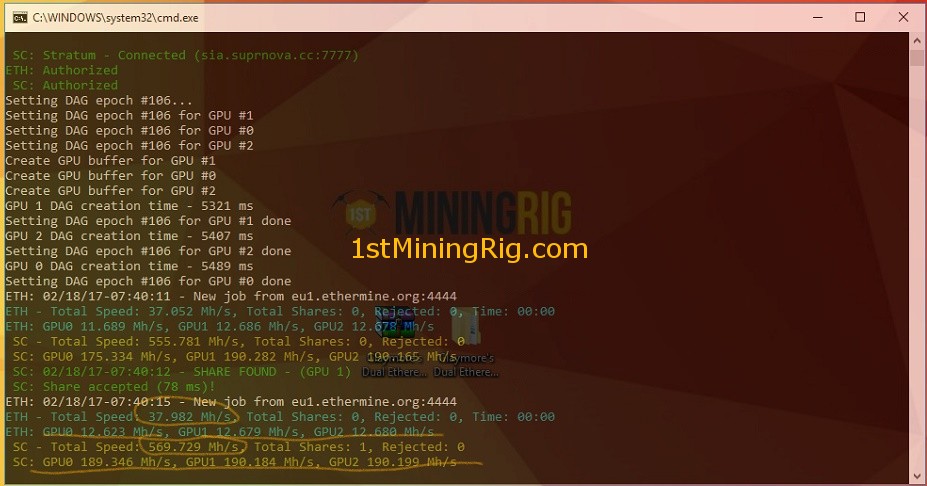
Mining profits for Siacoin only (price $0.000341341, February 8 2017):
| Min | SC0.412 | $0.000 |
|---|---|---|
| Hour | SC24.698 | $0.008 |
| Day | SC592.749 | $0.202 |
| Week | SC4149.244 | $1.415 |
| Month | SC17782.475 | $6.065 |
Remember that i have a very low hashing speed with this cards
D) Ethereum (ETH) & Ethereum Classic (ETC) dual mining LBRY Credits (LBC)
1 Preparing LBRY Credits Wallet key and Mining Pool- #1 The fastest way to create a wallet key for LBRY Credits is to signup with https://poloniex.com/, then go to “Deposits & Withdrawals“, the search form type “lbry” then click on “deposit” and it will generate a new key.
- Go to https://lbry.suprnova.cc/ and create an account if you don’t have one
- Then go to “My Account” ->”My Workers” and create a worker
- Add your wallet key in to your “Payment Address” by accessing “Edit Account“
- Go to Claymore’s Dual Ethereum+Decred_Siacoin_Lbry AMD+NVIDIA GPU Miner v7.4 folder, then copy the ETH.bat/ETC.bat file and paste it in the same folder, the system will automatically create a copy of the file that we created earlier, something like ETH – Copy.bat/ETC – Copy.bat.
- Rename ETH – Copy.bat/ETC – Copy.bat to something like ETH+LBC.bat/ETC+LBC.bat
- Right click on ETH+LBC.bat/ETC+LBC.bat, and click “Edit“
- Right after -epsw x, paste the following code -dpool stratum+tcp://lbry.suprnova.cc:6256 -dwal USERNAME.WORKERNAME -dpsw WORKERPASSWORD -dcoin lbc
- For username, worker and password use the details from suprnova account.
- The final code for ETH+LBC should look like this: EthDcrMiner64.exe -epool eu1.ethermine.org:4444 -ewal WALLETKEY.RIGNAME -epsw x -dpool stratum+tcp://lbry.suprnova.cc:6256 -dwal USERNAME.WORKER -dpsw WORKERPASS -dcoin lbc
- The final code for ETC+LBC should look like this: EthDcrMiner64.exe -epool eu1-etc.ethermine.org:4444 -ewal walletkey.rigname -epsw x -dpool stratum+tcp://lbry.suprnova.cc:6256 -dwal USERNAME.WORKER -dpsw WORKERPASS -dcoin lbc
- All set, run the any bat files and it will start mining ETH or ETC and LBRY at the same time
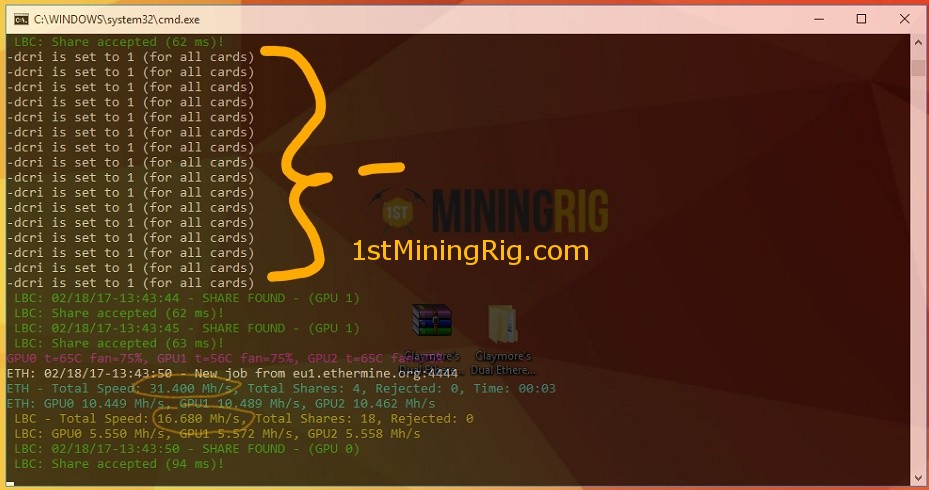
If you notice low hashing speed on ethereum, change the intensity in runtime with “+” and “-” keys and check current statistics with “s” key.
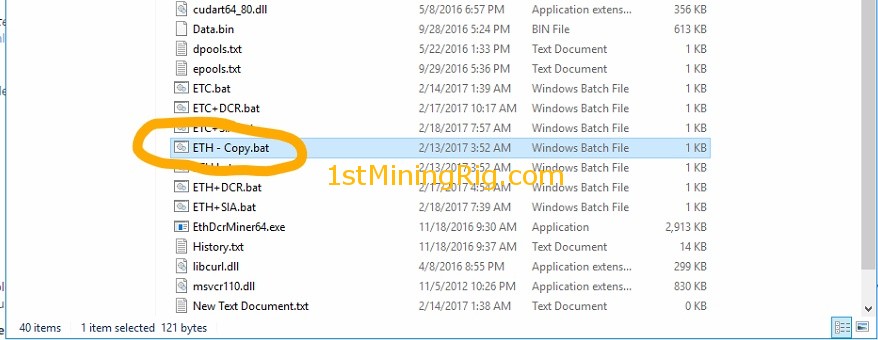


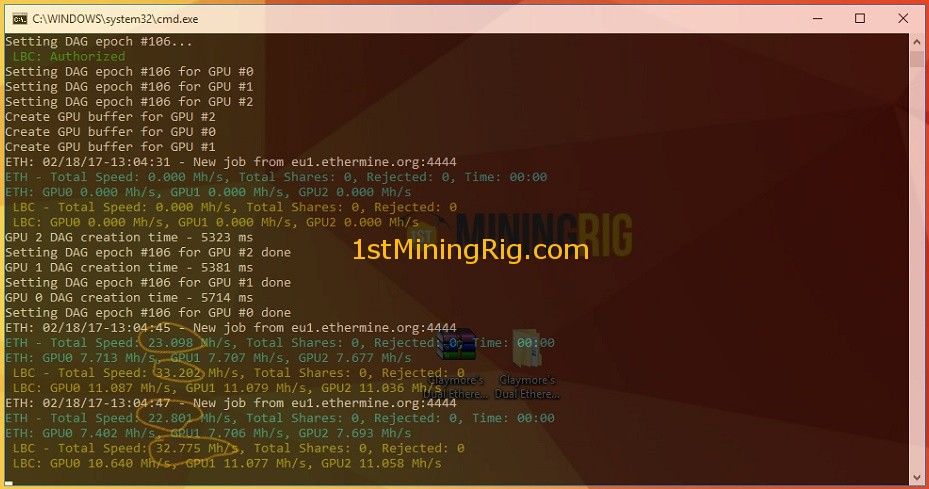
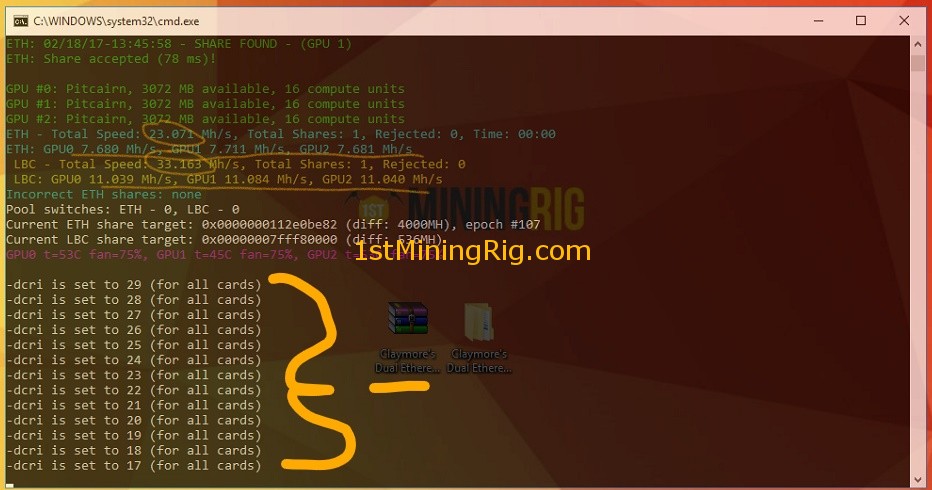
E) Ethereum (ETH) & Ethereum Classic (ETC) dual mining PascalCoin (PASC)
6 How to mine Ethereum (ETH) or Ethereum Classic (ETC) and PascalCoin (PASC)For full tutorial click here
Mining profits for Siacoin only (price $0.0218834, February 8 2017):
| Min | LBC0.002 | $0.000 |
|---|---|---|
| Hour | LBC0.097 | $0.002 |
| Day | LBC2.329 | $0.051 |
| Week | LBC16.302 | $0.357 |
| Month | LBC69.867 | $1.529 |
Remember that i have a very low hashing speed with this cards
That's it 🙂
I think the best coin to mine as dual is Siacoin or LBRY Credits, currently it is the most profitable and you can get around $30+ monthly, extra cash for electricity bill 😉
| per | In Decred | In dollars |
|---|---|---|
| Min | DCR0.000 | $0.000 |
| Hour | DCR0.013 | $0.024 |
| Day | DCR0.312 | $0.583 |
| Week | DCR2.187 | $4.080 |
| Month | DCR9.374 | $17.488 |
stats for 6x RX 470 4GB mining rig at stock settings
| per | In Siacoin | In dollars |
|---|---|---|
| Min | SC1.689 | $0.001 |
| Hour | SC101.368 | $0.035 |
| Day | SC2432.841 | $0.829 |
| Week | SC17029.888 | $5.800 |
| Month | SC72985.235 | $24.856 |
stats for 6x RX 470 4GB mining rig at stock settings
| per | In LBRY Credits | In dollars |
|---|---|---|
| Min | LBC0.027 | $0.001 |
| Hour | LBC1.634 | $0.036 |
| Day | LBC39.205 | $0.870 |
| Week | LBC274.435 | $6.089 |
| Month | LBC1176.149 | $26.094 |
stats for 6x RX 470 4GB mining rig at stock settings
Make sure you take a look at the Readme.txt file, you will find important information and details on how to setup your miner properly and to make it work stable all the time.
Download ready to run .bat files by sharing this!
[sociallocker]https://mega.nz/#F!csomUAJa!y8ZtjJGxJBku8NbmcjydaQ[/sociallocker]Thank you for reading!
As always, your comments, questions, and suggestions are welcome. I'd love to hear about your own experiences!
Stay connected and follow 1stMiningRig for future updates.


